
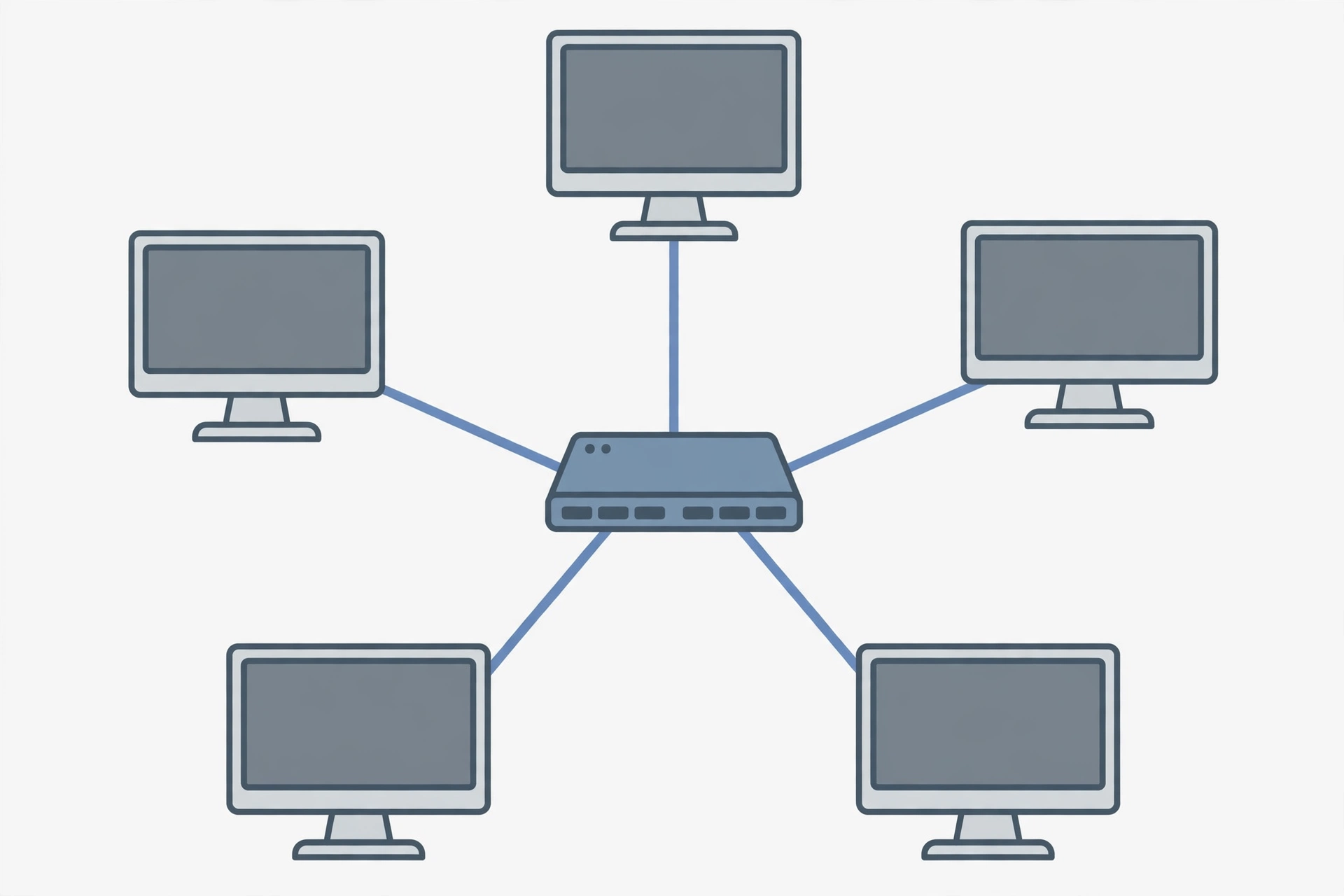
Star topology connects every device to one central switch by its own cable. Its main strengths are fault isolation, easy expansion and simple troubleshooting: one failed cable affects only one device. Its main weakness is the central switch itself: if the switch fails, the whole network goes down, and every device needs its own cable run.
If you only remember one thing, remember this: star topology trades one big risk for many small ones. A fault can only knock out one device at a time, but the switch in the middle is the one thing that must never fail.
What is star topology?
Star topology is a way of arranging a network so that every device connects to one central device by its own cable. The central device is usually a switch, and in older networks it was a hub. Nothing connects directly to anything else. If one computer wants to send data to another, the data travels to the switch first, and the switch passes it on.
Picture a wheel. The switch is the hub in the middle, and each device is a spoke. That is where the name comes from. It is the layout used in almost every home and office network today, because it is the layout that modern Ethernet is built around. A local area network in a home or office is almost always a star, even if nobody calls it that.
How does star topology work?
Each device has a point-to-point link to the central switch. When a device sends data, the switch reads the destination address and forwards the data to the right port only. The other devices never see it. This is called unicast forwarding, and it is what makes a switched star fast and private.
A hub works differently. A hub sends every piece of data to every device, and each device checks whether the data is for it. That wastes bandwidth and makes collisions possible, which is why hubs have disappeared from modern networks. When people talk about star topology today, they mean a switched star, not a hub.
The central device also sets the size of the network. A switch has a fixed number of ports. When the ports run out, you add another switch and connect the two switches together. That is called an extended star, and it is how a small office network grows into a large one without starting over.
Star topology at a glance
| Point | Star topology |
|---|---|
| What it is | Every device connects to one central switch by its own cable |
| Best for | Homes, small offices, schools, any LAN that needs to grow |
| Biggest strength | One fault affects one device only |
| Biggest weakness | The central switch is a single point of failure |
| Cost | Higher than bus, because of the switch and the extra cabling |
| Speed | Full speed per device with a switch; each link is full-duplex |
| Easy to expand? | Yes, plug a new device into a free port |
| Easy to fix? | Yes, each port has its own link light and error report |
What are the advantages of star topology?
One fault affects one device only
This is the biggest advantage. If a cable breaks or a computer fails, only that device loses its connection. The rest of the network keeps working. Compare that with bus topology, where one break in the main cable can take the whole network down, or ring topology, where one failed node can break the token-passing circuit. In a star, faults stay small.
Easy to add and remove devices
Adding a device takes one cable to a free port on the switch. Nobody else’s connection is disturbed, and nothing needs to be switched off. Removing a device is just as simple. This is why star networks suit places that change often, like offices and schools.
Easy to troubleshoot
Each device has its own cable and its own switch port, so a fault is easy to find. The switch port for a dead device shows no link light, and a managed switch reports errors and traffic per port. You check one cable and one port, not the whole network.
Full speed for every device
With a switch at the centre, each device gets its own full-duplex link, which means it can send and receive at the same time. There are no collisions, because no two devices share a cable. That is a large part of why Ethernet over a star is faster in practice than the older shared designs. Our guide to Ethernet vs Wi-Fi explains how the wired link compares with wireless in a real home.
Central management and security
Everything passes through one device, so it is easy to manage and protect. A switch can separate traffic into VLANs, give priority to voice and video calls, control which devices are allowed to connect, and log what happens on each port. A UPS on the switch keeps the whole network up through a short power cut.
What are the disadvantages of star topology?
The central switch is a single point of failure
This is the biggest disadvantage, and it is the mirror image of the biggest advantage. If the switch loses power, its firmware crashes, or its hardware fails, every device connected to it loses the network at the same time. In a small home that is an annoyance. In an office, it stops work. The fix is redundancy: a second switch, stacked switches, or a spare kept ready, but that adds cost and complexity.
More cabling than other layouts
Every device needs its own cable run back to the centre. In a large network that adds up fast. Ten devices at 50 metres each need 500 metres of cable, where a bus along the same line might need only 50. The cable itself is cheap, but running it through ceilings, walls and conduits takes time and labour. The type of cable matters too; our guide to types of network cables explains Cat5e, Cat6 and fibre.
Higher cost
A star needs a switch, and switches cost money. A small 8-port gigabit switch is cheap, but a 24-port managed switch for an office costs far more, and a large network needs several switches plus the uplinks between them. For a very small setup, that cost can be hard to justify against a simpler layout.
Performance depends on the switch
The switch is the bottleneck. If many devices send heavy traffic at once and the switch is underpowered, packets get dropped and the network feels slow even though every cable is fast. Choosing a switch with enough backplane capacity matters, and our network switch buying guide covers what to look for.
Cable length limits
Each link has a maximum length. For twisted-pair Ethernet the limit is 100 metres (TIA-568), and beyond that the signal degrades. Long buildings need extra switches or fibre uplinks to bridge the distance, which adds cost and another point of failure.
Star vs bus vs ring: which topology is best?
| Feature | Star | Bus | Ring |
|---|---|---|---|
| Layout | Every device to one central switch | Every device on one shared cable | Every device connected in a closed loop |
| One cable fails | Only that device is affected | Whole network can go down | Loop can break (unless dual ring) |
| One device fails | Only that device is affected | Rest keeps working | Token passing can stop |
| Easy to expand | Yes, add a port | Hard, the cable must be extended | Hard, the loop must be broken and remade |
| Cost | Higher (switch + cabling) | Lowest | Medium |
| Speed | Full speed per device with a switch | Shared, collisions slow it down | Shared, one direction at a time |
| Used today? | Almost every LAN | Almost never | Rare, mostly legacy or dual-ring |
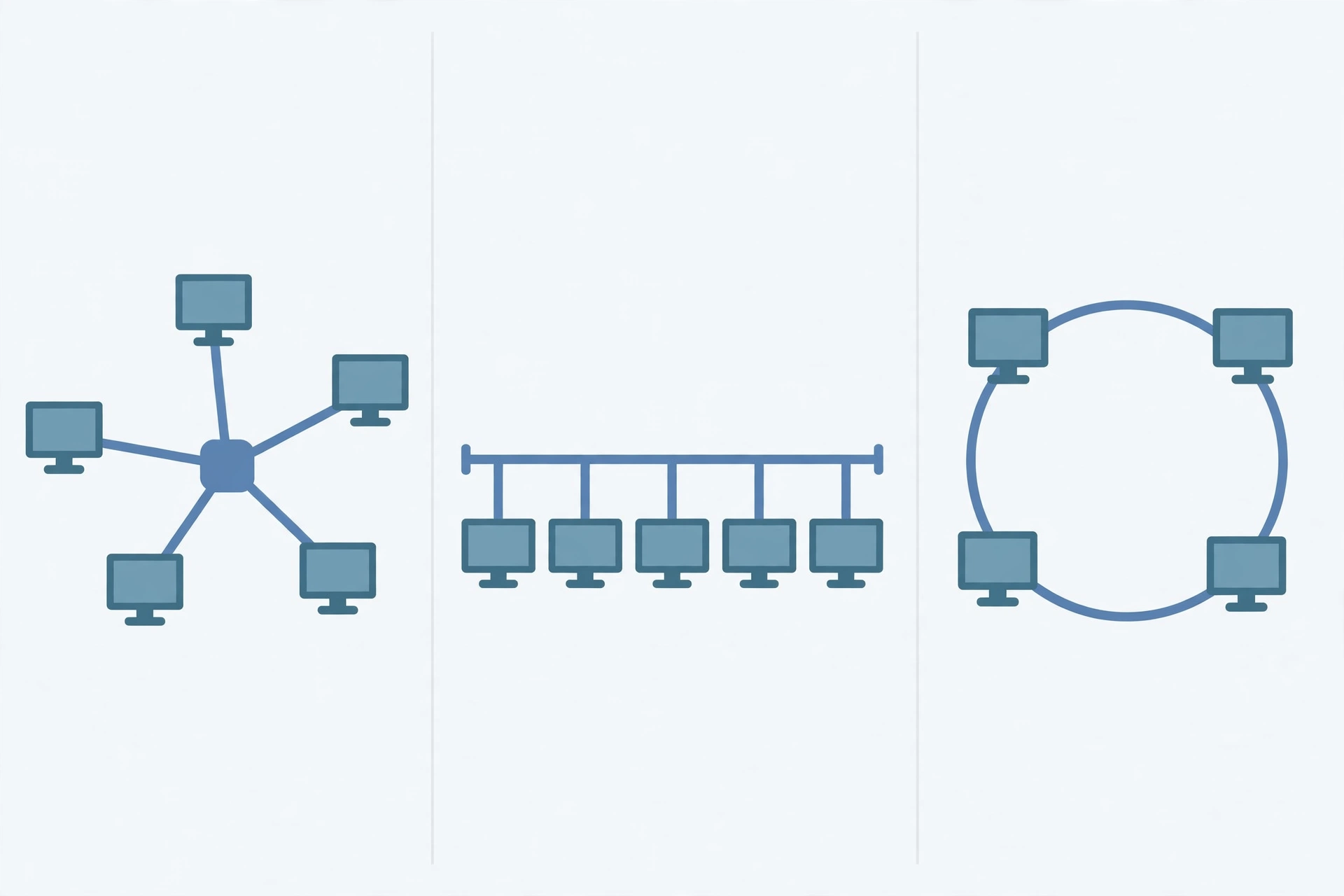
Star wins on reliability and ease of use, which is why it is the standard layout for modern LANs. Bus is cheaper but fragile, and ring survives only in specialist setups with dual rings. For GCSE Computer Science, this table is the comparison to learn: star, bus and ring are the three topologies the exams ask about, and the trade-off in each row is the point the question is testing.
Hub vs switch: does the central device matter?
Yes, it changes everything. A hub is a dumb repeater: it sends all traffic to all devices. A switch is smart: it learns which device sits on which port and sends traffic only where it needs to go.
| Feature | Hub | Switch |
|---|---|---|
| How it forwards data | To every device | Only to the destination device |
| Collisions | Yes, shared medium | No, each port is its own collision domain |
| Speed | Shared, slows as devices are added | Full speed per port, full-duplex |
| Security | Every device sees all traffic | Traffic stays private to its destination |
| Used today? | No, obsolete | Yes, the standard central device |
If you are buying the central device for a star network, buy a switch, not a hub. Hubs are museum pieces now, and no new network should use one.
When should you use star topology?
Use star topology when reliability matters more than the lowest cost, when the network will grow, and when someone has to fix faults quickly. That covers most real networks: homes, offices, schools, shops and small businesses. A home with a router and a switch is a star, and so is an office with a 48-port switch in a cabinet.
Do not use star when the budget is tiny and the network will never grow, or when the central device cannot be protected. A single-room setup with two computers can use a direct cable instead, and a network in a place with unreliable power needs a UPS on the switch or a different design.
Frequently asked questions
Is star topology better than bus topology?
Yes, for almost every real network. Star isolates faults to one device, is easier to expand and troubleshoot, and gives each device its full speed with a switch. Bus is cheaper and simpler, but one break in the shared cable can take the whole network down, and all devices share the same bandwidth.
What is the biggest disadvantage of star topology?
The central switch is a single point of failure. If the switch fails, every device connected to it loses the network. The risk is real but manageable: a spare switch, a UPS, or stacked switches with failover remove most of it.
Why is star topology the most common?
Because it is the most practical. It is easy to install, easy to expand, easy to fix, and it gives every device a dedicated full-speed link. Modern Ethernet is designed around it, so almost every LAN built today is a star by default.
Can you use Wi-Fi in a star topology?
Yes. A wireless access point connects to the switch like any other device, and the devices that connect to it wirelessly are part of the same star. Most homes run exactly this: a router and switch at the centre, wired devices on cables, and phones and laptops on Wi-Fi.
How many devices can a star network have?
As many as the switch has ports. An 8-port switch supports 8 wired devices. When the ports run out, you add another switch and connect the two, which turns the star into an extended star. There is no fixed limit, only the number of switches you are willing to add.
What happens if the central switch fails?
Every device connected to it loses the network immediately. Devices can still work offline, but nothing can reach anything else on the network, including the internet. That is why offices keep a spare switch or use stacked switches, and why the switch should sit on a UPS.
Conclusion
Star topology is the standard layout for a reason. It keeps faults small, makes the network easy to grow and fix, and gives every device its own full-speed link. Its one real weakness is the switch in the middle: if that fails, everything fails with it. For a home or a small office, the answer is simple. Build a star, buy a decent switch, keep a spare if the network matters, and read our guide to LAN networks before you plan the layout.