
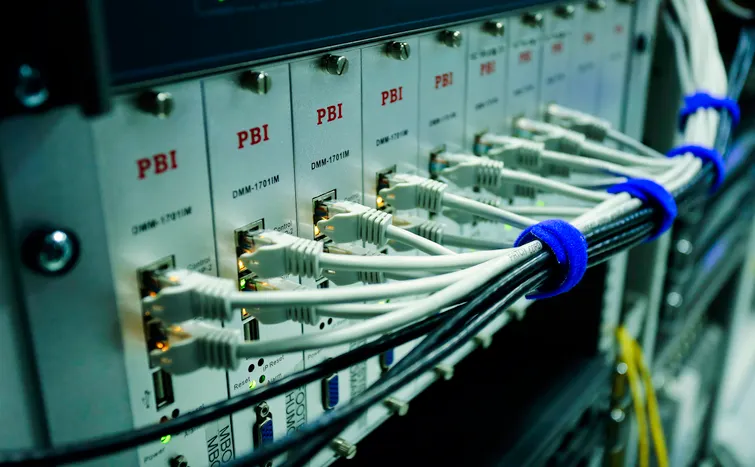
A network switch is the central device that connects computers, printers, servers, and other equipment within a LAN, directing data only to the device it is intended for rather than broadcasting it to every port. Choosing the right switch affects speed, reliability, and how easily a network can grow.
Quick Answer
For most small offices and home networks, an unmanaged Gigabit switch with 8 to 16 ports is enough. Larger networks benefit from a managed switch, which allows VLANs, traffic prioritisation, and remote monitoring. If any connected devices need both data and power over a single cable, such as CCTV cameras or VoIP phones, a PoE switch removes the need for separate power adapters.
What Does a Network Switch Actually Do?
A switch operates at the data link layer of the OSI model, reading the MAC address of incoming data and forwarding it only to the correct destination port. This is what separates a switch from an older network hub, which simply broadcasts every packet to every connected device regardless of who needs it, wasting bandwidth and increasing collisions.
Types of Network Switch
- Unmanaged switches. Plug-and-play devices with no configuration options, ideal for small networks that need simple, reliable connectivity.
- Managed switches. Configurable devices supporting VLANs, Quality of Service settings, and remote monitoring, suited to business networks that need more control.
- PoE (Power over Ethernet) switches. Deliver both data and electrical power through the same cable, commonly used for IP cameras, access points, and VoIP phones.
- Gigabit switches. Support data transfer speeds of 1 Gbps per port, now the standard baseline for most new network installations.
- 10G switches. Offer 10 Gbps speeds, typically used for server rooms, video editing workflows, or high-demand backbone connections.
How Many Ports Do You Need?
Count every device that needs a wired connection, then add roughly 20 to 30 percent extra capacity for future growth. An 8-port switch suits a small home office. A 16 to 24-port switch covers most small business networks. Larger offices often use a 48-port switch at the core, connecting smaller switches at each floor or department.
Managed vs Unmanaged Switches: Which Do You Need?
| Unmanaged Switch | Managed Switch | |
|---|---|---|
| Setup | Plug and play, no configuration | Requires configuration via web interface or CLI |
| Cost | Lower | Higher |
| VLAN support | No | Yes |
| Traffic prioritisation | No | Yes, via Quality of Service settings |
| Best suited for | Home and small office networks | Business networks needing segmentation and control |
Why PoE Switches Are Increasingly Popular
A PoE switch removes the need to run separate power cables to devices like CCTV cameras, wireless access points, and VoIP phones. This significantly simplifies installation, particularly in ceiling-mounted or hard-to-reach locations, and is one reason PoE has become the default choice for modern security camera and access point deployments.
How a Switch Fits Into Your Wider LAN
A switch is the backbone hardware of a Local Area Network, connecting every wired device together. See our guide on LAN network advantages and disadvantages for how switch-based star topology compares with older network designs.
Buying Checklist
- Count your current devices needing a wired connection, then add capacity for growth
- Confirm whether you need Gigabit or 10G speeds based on your workload
- Decide if PoE is needed for cameras, access points, or VoIP phones
- Choose managed if you need VLANs, traffic prioritisation, or remote monitoring
- Check rack-mount compatibility if installing in a server cabinet
Frequently Asked Questions
Do I need a managed or unmanaged switch?
Most home and small office networks only need an unmanaged switch. Choose managed if you need VLANs, traffic control, or remote monitoring.
What is the difference between a switch and a router?
A switch connects devices within a single network, while a router connects separate networks together, such as your LAN to the internet.
Do PoE switches cost more to run?
PoE switches use more power than standard switches since they supply electricity to connected devices, though this is usually offset by not needing separate power adapters.
How many ports should a small office switch have?
A 16 to 24-port switch covers most small business networks comfortably, allowing room for future growth.
Is Gigabit speed enough for most networks?
Yes. Gigabit speed is sufficient for the vast majority of home and business networks, with 10G reserved for server rooms and high-demand workloads.
Related Reading
- LAN Network: Advantages and Disadvantages
- Types of Network Cables Explained
- Network Security: A Complete Guide for Businesses
For technical background on Ethernet switching standards referenced in this guide, see the IEEE 802.3 Ethernet working group.